Intercom audio is bad: what each noise means and where the fault is
Published 10/14/2026
The intercom rings, you pick up, and on the other end there’s a hum, a crackle, a voice you can barely make out, or nothing at all. It’s one of the most annoying faults because the system half works: the call arrives, the conversation doesn’t. The good news is that the kind of noise says a lot about where the problem is, and knowing that before you call a technician saves diagnosis time, which is exactly what you’re paying for.
If you don’t know yet what’s wrong with your intercom, start with intercom not working, which covers the five typical fault types. This article is for when you already know the audio is what’s failing.
Why does the intercom ring fine but sound bad?
Because the call and the conversation travel along different paths, and audio isn’t even one path: it’s two. The intercom repair manual published by CAEPE, the Argentine intercom industry chamber, treats “communication from outside in” and “communication from inside out” as functions that, while related, are generally independent. On top of that it covers four sound-quality problems separately: AC noise (the hum), acoustic feedback (the squeal), crackling, and distortion.
That split is the key to the diagnosis. Hearing the street while the street can’t hear you isn’t “the intercom acting up”: it’s one path that works and another that doesn’t, and each one runs through different parts.
One caveat before going on: all of this applies to traditional 4- or 5-wire intercoms, which is what most Argentine buildings have. Digital 2-wire systems have manufacturer-specific electronics, and the same CAEPE manual recommends going straight to the manufacturer’s information for the specific model.
Is the audio bad in the whole building or just your apartment?
Ask a neighbor first. If everyone has the same problem, the fault is in the shared parts: the power supply, the street panel or the common wiring, and it’s a building (consorcio) matter. If only you have it, the likely culprit is your handset or the run of cable going up to your unit.
In a 4+N or 3+N system, like the analog Fermax or Commax ones, the audio wires are among the common conductors that run through the whole building. That’s why an audio fault that shows up in every apartment at once is almost never “bad luck with lots of handsets”: it’s a single shared part.
You can’t hear the person at the street door?
That’s the outside-in path, and in a traditional intercom it runs through the power supply, the street-panel microphone, the cable coming down from the panel, and your handset’s earpiece. The check order described in the CAEPE manual follows exactly that: first, that the power supply delivers DC voltage; then, with the handset to their ear, the technician works the hook switch. If they hear a sharp click, the suspect is the street-panel microphone. If it’s very faint, it may be the handset earpiece or a broken conductor.
A surprising detail: if any stretch of the wiring runs underground or is exposed to water, the manual warns that electrolysis “always cuts the positive pole.” Moisture doesn’t just add noise; over time it can eat through a wire entirely, and the symptom is that from one day to the next you stop hearing the street.
You can hear the street, but they can’t hear you?
That’s the reverse path, inside out: your voice goes into the handset microphone, through the amplifier (which in many buildings sits in the power supply, and in others is attached to the street panel), and out of the street speaker. Those three are the suspects.
A technician starts with the street-panel speaker, whose coil must show continuity. Then they check whether the handset’s hook contacts actually cut off when you hang up: the CAEPE manual describes how, when they don’t, current keeps flowing with the handset on the hook and ends up damaging the phone’s microphone. If all that checks out, what’s left is the amplifier or the cable between your handset and the amplifier input.
If the handset microphone is what failed, the repair is local and simple, and universal intercom handset covers what to check before buying a new one.
What’s that constant background hum?
It’s what the trade calls “AC noise”: a low, steady 50 Hz hum, the rhythm of mains power in Argentina. It shows up when the alternating current the intercom uses for other things (the buzzer, the door strike) leaks into the audio.
The test the CAEPE manual describes splits the problem in two with a single step: disconnect the power supply’s AC output. If the hum goes away, the fault is in the installation, and then it matters when it started. If it’s new, the first thing to look for is cable exposed to the weather or underground and splices exposed to moisture, because water lets the AC leak into the audio returns. If it’s been there since the day of installation, it’s induction between conductors, and the fix is a power supply designed to avoid it. If the hum stays with the AC disconnected, the fault is in the power supply (worn filter capacitors) or in the street panel’s electronic microphone, whose electret capsule also produces that noise when it’s damaged.
Watch for a related case: if instead of a hum you hear the call tone every time someone lifts a handset, it may be a voltage difference between the street panel’s metal plate and the wall’s ground. A technical article in CAEPE’s supplement, written by Antonio Haiy (Netyer), explains that in systems that detect calls through the button’s ground, that difference makes the system interpret that a call is in progress and, in worse cases, can overload the power supply to the point of burning out its transformer. Not something to touch without a technician.
And the crackling?
The crackle, that sizzle like hot oil, has two classic causes according to the same manual. The first is the handset’s carbon microphone: inside are carbon granules between two electrodes, and when the electrodes’ gold plating wears off, the granules make false contacts as they move. The fix is replacing the microphone or the handset.
The second is moisture in the installation: splices corrode and produce the same kind of false contact, but in the cable. The manual recommends checking above all the splices exposed to the weather and those covered only with electrical tape.
To tell one from the other, the usual question applies: if several neighbors have the crackle, it isn’t your microphone.
Why does the intercom squeal or feed back?
The high-pitched squeal is acoustic feedback: sound coming out of the street-panel speaker goes back into the street-panel microphone and amplifies in a loop. The CAEPE manual explains that feedback limits how much volume you can give both the street speaker and the handset earpiece, that it’s more noticeable in enclosed entryways and corridors where sound bounces around, and that it’s harder to control in 2-wire systems.
The fix isn’t swapping parts but adjusting: panels and power supplies usually have a trimmer or a volume control, and the technician has to decide, case by case, whether to favor volume at the street or in the handset. Fermax, for example, explains in its official support pages that its street panels’ volume is set during installation according to street noise (traffic, how heavy it is, the type of road surface). If the building’s surroundings changed and it now squeals, a readjustment may be enough.
And if it’s too quiet or distorted?
If the voice comes through very faint, the CAEPE manual points to the handset earpiece or a broken conductor, and in buildings with an amplifier it’s worth checking the volume setting: on Fermax’s panel audio modules, for example, volume is adjusted separately in each direction, street-to-home and home-to-street.
Distortion, on the other hand, usually shows up in the voice coming out of the street speaker, and has three suspects: a worn handset microphone, a street-panel speaker with a stuck coil, or a faulty amplifier. A technician rules each one out by temporarily swapping in a test part.
How much does it cost to fix, and when is it worth modernizing?
Like any intercom repair, it’s quoted as labor plus parts. A figure in pesos goes stale within months, so it’s better to think in technician time: using the same reference as intercom not working (the Genz Clima and Home Solution surveys), a typical repair takes between half a day and a full day of technician work. A volume readjustment or a handset microphone sits at the short end; tracking down a wet splice across the whole building, at the long end.
Now, if your audio problem is chronic because the run of cable to your apartment is damaged, there’s another way out. DoorLink connects at the street panel and sends the call over the internet straight to your phone, so the broken wiring in your wall stops being used: you answer with video on your phone, without depending on that run or on your handset. No opening walls, and neighbors who’d rather keep their usual handset can, because DoorLink’s relay is fail-safe: without power or connectivity it falls back to passthrough mode and the original intercom works as if DoorLink weren’t there.
What a retrofit doesn’t fix is a fault in the street panel itself or its amplifier: that gets repaired. But if the panel is beyond repair, DoorLink installs the complete system with its own street panel. Replace or modernize the intercom compares repairing, modernizing and replacing everything, and you can request a quote for your building.
In short
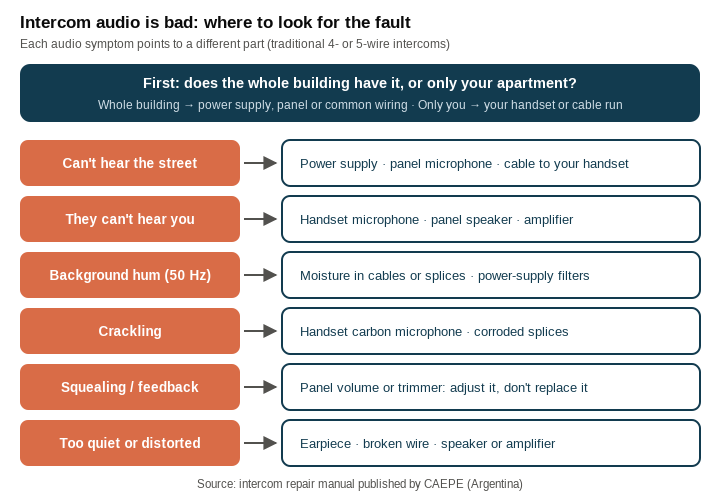
Each noise points somewhere different. If you can’t hear the street, check the power supply, the street-panel microphone and the cable to your handset. If they can’t hear you, your handset microphone, the street speaker and the amplifier. The hum is AC leaking into the audio, almost always through moisture or the power supply; crackling, a worn carbon microphone or corroded splices; squealing, a volume or trimmer that’s set wrong. And before all of that, the question that splits the problem in two: does the whole building have it, or only you?