DoorLink install day: what happens, how long it takes, and whether the intercom goes down
Published 9/28/2026
“How long does installation take, and does the building lose its intercom while it’s happening?” is, per the vendor checklist for choosing a smart intercom, the uncomfortable question almost no quote answers in writing. It makes sense that it worries people: it’s the one part of the process where, for a few hours, the building depends on someone doing their job right at the entrance panel. Here’s what actually happens, step by step, with DoorLink.
How long does installation take?
A few hours, not days. A certified technician installs it on top of the system the building already has, with no rewiring and no breaking walls: the module connects straight into the street panel’s terminal block, so nothing needs to run up the building’s vertical wiring runs or touch each unit’s wiring. That’s the same reason a broken cable run inside a wall — the classic “my neighbors’ intercom works but mine doesn’t” case — stops mattering: DoorLink picks up the call before it would have to travel up that wiring at all.
Does the building lose its intercom while it’s being installed?
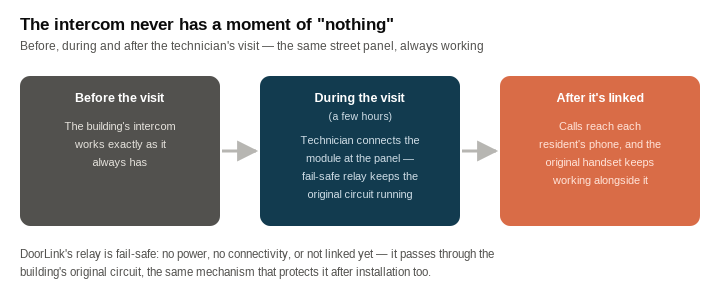
No. And the reason isn’t “trust us” — it’s how the circuit is built. DoorLink’s relay is fail-safe, meaning its default state — no power, no connectivity, or simply because it hasn’t finished being configured yet — is to pass the signal through the building’s original circuit, exactly as if DoorLink weren’t there. That holds both during installation and afterward: if connectivity or power to the module ever drops, the same mechanism keeps the old handset ringing and the door opening as always, without depending on DoorLink actually being up at that moment.
In other words, the intercom never passes through an in-between state where it “does nothing.” Before the visit, it works as always. During the visit, it keeps working as always while the technician is at the panel. Only once the module is powered, connected, and linked to your building does it start adding the new part — calls to residents’ phones — without taking anything away from what was already there.
What does the technician actually do, step by step?
- Connects the module at the street panel’s terminal block, on top of the existing 4+n or 5+n wiring (Commax, Fermax, and similar brands). The panel and the button a visitor presses don’t change.
- Powers it on. As soon as it has power and an internet connection, the device registers itself in the system — the technician doesn’t need to manually enter anything at this step.
- Links it to your building from the app: scans a code carried on the device itself and picks the matching building. This is the step that ties that specific module — and no other — to your HOA.
- Tests a real call before leaving: presses the street button, confirms it rings at least one linked phone, and confirms the door opens. If the building keeps its original handsets, confirms those still ring too.
All of this happens at the entrance panel. Installing DoorLink doesn’t require coordinating access to every apartment — see the next question.
Do you need to coordinate with every resident, or get into every apartment?
No, and that’s a real difference from a traditional construction job. The installation happens once, at the street panel, not per unit. Each resident joining the app is a separate step that doesn’t depend on the technician’s visit and doesn’t need to be coordinated the same day: whoever manages a given apartment scans a QR code (or types a three-word code), and their phone is linked in a minute, whenever it’s convenient for them. A twenty-unit building doesn’t need twenty installation appointments — it needs one visit to the panel and twenty sign-ups in the app, each on its own schedule.
What if the intercom is already destroyed, stolen, or there isn’t one?
Then the job is different: DoorLink installs the complete system, including its own street panel, because there’s nothing existing to retrofit onto. It’s the same one-time, hardware-included installation as any other DoorLink install, with no extra charge for starting from scratch. Visitors still press a physical button — no phone, no mobile data, no QR code to scan — so the experience for whoever’s ringing the bell doesn’t change, whatever state the old intercom was in.
What’s worth sorting out before the technician arrives?
What speeds up the visit most is making sure there are no surprises when the technician opens the panel:
- Confirm the building’s wiring type ahead of time (4+n or 5+n, Commax, Fermax, or similar), so the technician shows up knowing what to expect. If your building runs one of those brands, modernizing a Commax intercom and modernizing a Fermax intercom go deeper into brand-specific wiring.
- Sort out access to the panel ahead of time: who holds the key to the room where the street panel lives, and whether the building manager or doorman needs a heads-up.
- Confirm how many units will be covered, including any commercial units, the doorman’s unit, the garage, and staff apartments — the ones most often left out when a quote is first requested.
All of this is part of the same checklist worth bringing to any vendor — not just DoorLink — before signing: the full version is in how to choose a smart intercom for your building.
The short version
Installation takes a few hours, happens once at the street panel, and needs no rewiring or wall-breaking. While it’s happening, the intercom doesn’t go dark: DoorLink’s fail-safe relay keeps the original system working until the new module finishes being configured, and keeps working as a fallback afterward. Each resident joins the app on their own, whenever they want, independent of the technician’s visit. If your building is still deciding, how much a smart intercom costs for an HOA explains what drives the cost and how it splits per apartment; to find out what yours would cost, send us a photo of the intercom on WhatsApp. If you already have a quote on the table and want all of this confirmed in writing before the assembly vote, reach out through the contact form.